
Sign Up for Workload with Google Single Sign-On (SSO) 🔒

AdAlpha
October 30, 2025
Workload now lets you start faster and manage your account more easily. With the new Google Sign-In option, you can sign up for Workload with Google in just one click—no extra passwords or setup steps.
This update boosts both convenience and security. When you authenticate through Google, Workload never handles your password, and Google’s industry-leading encryption and 2-step verification keep your account secure.
You can still choose the standard email and password method, but signing up with Google gives you a smoother onboarding process and centralized access for your team. Whether you build automations for yourself or collaborate with others, you’ll get started faster and stay protected every step of the way.
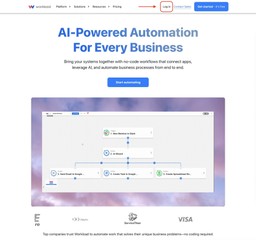
Step 1: Go to the Workload Login Page
From the Workload homepage, click Log in in the top navigation bar.

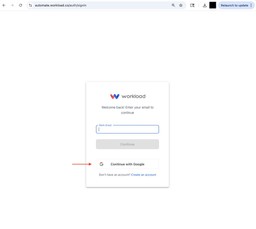
Step 2: Click “Continue with Google”
On the sign-in screen, click Continue with Google instead of entering your email manually.

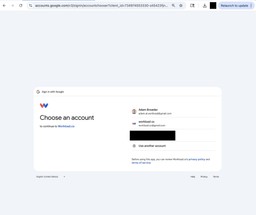
Step 3: Select Your Google Account
Pick the Google account you’d like to connect to Workload.

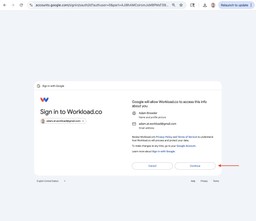
Step 4: Grant Access
Review the requested permissions, then click Continue to authorize access.

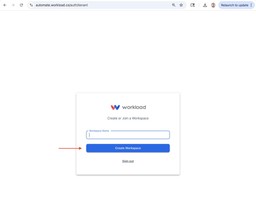
Step 5: Create a Workspace
Once connected, simply enter your Workspace Name to finish setup.

🔒 Why Use Google SSO?
Connecting with Google isn’t just faster — it’s smarter and more secure.
When you sign in with Google, Workload verifies your identity through Google’s trusted authentication system. Workload never stores your password, and every login stays protected by Google’s advanced security tools.
✅ One-click login — Skip password resets and access your workspace instantly
✅ Enterprise-grade security — Google safeguards your account with encryption, 2-step verification, and OAuth 2.0 protocols
✅ Zero password storage — Your credentials remain private and never reach Workload’s servers
✅ Streamlined onboarding — Team members can join immediately using their Google Workspace accounts
✅ Centralized access control — Admins manage permissions directly through Google Workspace
✅ Consistent, compliant access — Businesses meet security and audit requirements with confidence
Ready to automate your workflows?
Start building powerful automations with Workload today.
Get Started Free